On Thursday, November 12, 2026, at roughly 16:00 GMT, millions of professionals opened their laptops and phones to find their digital nervous system flatlined. Over the next 18 hours, a catastrophic Microsoft 365 outage crippled Outlook (Exchange Online), Microsoft Teams, and Copilot across 74 countries. From the US House of Representatives and European ministries to hospitals, airlines, Australia’s federal police, and the Supreme Court of the Philippines, organizations that had consolidated their communications into a single cloud monoculture were left staring at spinning loaders and status-page apologies.
More than 12 hours into the disruption, Microsoft reported only “marginal success” in restoring services. Even more telling than the outage itself was its cause: not a cyberattack, but an internal infrastructure failure—elevated load, failing automated health checks, and a cascading “thundering herd” gridlock where every server brought back online was immediately swamped and knocked back down by its peers attempting to resynchronize.
When we analyze major infrastructure failures—much like our post-mortem on how automated cloud vulnerabilities escalated into physical sabotage in the European cold-chain cyberattack—the lesson is rarely about one isolated bug. It is about architectural concentration risk. Here is a breakdown of what the November 2026 Outlook outage actually cost businesses, and how a modular, hybrid VPS + on-premises email architecture eliminates single-vendor catastrophic risk while keeping your mailbox on hardware you actually own.
1. The Real Cost of the Outage: Why SLA Credits Don’t Pay Payroll
When a hyperscaler goes dark for a full business day, the financial damage is wildly asymmetric. While Wall Street analysts characterized the direct financial blow to Microsoft as “benign”—estimating contractual Service Level Agreement (SLA) payouts at roughly $100 million to $400 million—economic consulting groups such as the Anderson Economic Group projected global lost productivity and business interruption losses reaching up to $7 billion.
For an individual small-to-midsize business (SMB), law firm, or medical practice, the gap between vendor compensation and real-world loss comes down to three harsh realities:
A. The SLA Credit Illusion
Enterprise cloud SLAs typically refund a percentage of your monthly subscription fee (25% to 100%, and only if monthly uptime drops below strict thresholds). If you pay $22 per user/month for Microsoft 365 Business Premium, a 100% SLA credit nets you $22. Compare that to a 25-person law firm, medical clinic, or logistics broker losing an entire day of client intake, time-sensitive filings, scheduling, and billing—easily tens of thousands of dollars in stalled revenue and idle labor.
B. The Cyber Insurance Blind Spot
Many organizations carry cyber liability insurance assuming it covers digital downtime. However, because Microsoft explicitly confirmed there was no malicious activity or cyberattack, standard cyber policies—which require a breach, ransomware, or hostile intrusion to trigger business-interruption coverage—generally do not pay out for a cloud vendor’s botched internal network change. Businesses absorb 100% of the operational shock, IT overtime, and post-outage catch-up backlog.
C. “Intensive Inertia” and Unplanned Dependency
As technology analyst Rupert Goodwins noted in Al Jazeera’s coverage of the outage, Microsoft has relied on intensive inertia—customers feel migrating away is too painful, until the pain threshold of staying finally breaks. And because modern SaaS suites tightly couple email, chat, identity, and AI, Outlook’s failure didn’t stay isolated: it degraded Teams, broke Copilot, and even bottlenecked third-party AI integrations. As Cambridge researcher Walter Pasquarelli warned, every organization must answer one question: What is the minimum viable service we need to keep running when a global cloud provider goes down?
2. The Curbside Mailbox & The File Cabinet: A Better Mental Model
Most businesses assume they have only two choices for email: surrender total control to a hyperscaler (Microsoft 365 or Google Workspace), or run a mail server directly on an office internet connection—where dynamic IPs, blocked residential Port 25, and local ISP hiccups ruin deliverability.
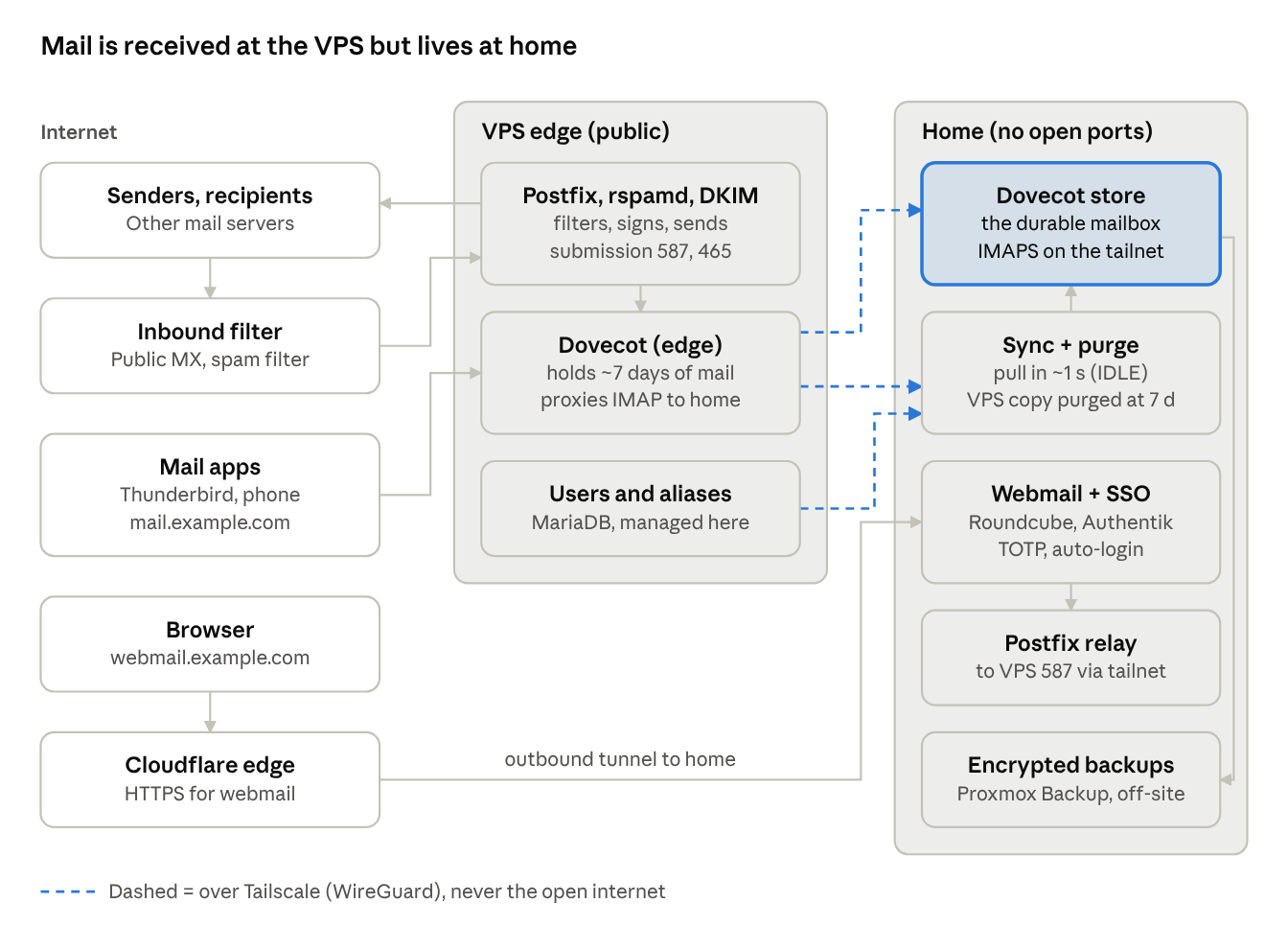
There is a far more resilient third option: a hybrid VPS edge paired with an on-premises mail store. Think of it like paper mail at home:
- The Curbside Mailbox (A Small Cloud VPS): The post office delivers letters to a mailbox at the curb. It has a clean, public static IP address so the internet can deliver mail to it—and so your outgoing mail passes SPF, DKIM, DMARC, and reverse DNS checks—but nothing is stored there long-term. It holds only about 7 days of recent mail before safely purging verified messages.
- The Private Path (Tailscale / WireGuard Mesh): Every time a letter lands in the curbside box, the flag goes up (
IMAP IDLE). Your home or office server walks down an encrypted, private WireGuard tunnel and brings the letter inside within 1 to 3 seconds. Your office firewall opens zero inbound ports and needs no static IP. - The File Cabinet Inside Your House (On-Premises Hardware You Own): Every mailbox, archive, calendar, and attachment lives durably on your own Proxmox/ZFS storage (and encrypted off-site backups). With a hosted provider, your letters live in the post office’s own filing room—if the post office closes for 18 hours, as Outlook did on November 12, you can’t touch any of them. Here, the file cabinet stays in your building.
And there is no usability penalty. On our reference deployment, inbound mail travels from the sender through a third-party spam filter to the VPS and into the on-premises file cabinet in 10–15 seconds total. Outgoing mail from webmail reaches Gmail in about 2 seconds. Desktop clients (Thunderbird, Apple Mail, Outlook) and phone apps connect normally to one ordinary hostname (mail.yourdomain.com).
3. Why Modularity Beats Monoculture: Inside the Architecture
The true power of this hybrid design isn’t just self-hosting—it is strict modularity. Every layer has one job, communicates over standard open protocols, and can be swapped or replaced independently without touching your mail archive:
- Inbound Spam Filter (Public MX): A lightweight third-party filter sits in front as the public MX, stripping junk before it ever touches your VPS and queueing mail automatically if your VPS is undergoing maintenance.
- Disposable VPS Edge (Postfix + rspamd + OpenDKIM + Dovecot Proxy): A modest 2 vCPU / 4 GB VPS handles SMTP transport, second-stage spam scoring, 2048-bit DKIM signing, and transparently proxies IMAP sessions over Tailscale to your on-prem store.
- Additive, Hash-Verified One-Way Sync: Traditional sync tools like
imapsynccan mirror accidental deletions. Instead, a dedicated pull service copies new mail from the VPS to your on-prem store one-way, records a SHA-256 content hash in a ledger, and runs an independent confirmation pass. Only after 7 days—and only if pulls are healthy and hash-verified—does the VPS purge its temporary copy. - Zero-Exposure Webmail & MFA (Roundcube + Cloudflare Tunnel + Authentik SSO): Browser webmail runs locally on loopback, published through an outbound-only Cloudflare Tunnel and gated by self-hosted Authentik SSO with TOTP MFA.
- Encrypted Off-Site Backups & Health Monitoring: Proxmox Backup Server (PBS) maintains encrypted off-site snapshots of the on-prem mail disk, while dedicated HTTP health endpoints monitor sync lag, queue age, disk usage, and TLS certificates.
4. Failure-Mode Resilience: What Happens When Things Break?
No architecture is 100% outage-proof—the difference is who holds the keys to recovery and whether a single company’s mistake can lock you out of your own history. Here is how the hybrid modular stack behaves across five real-world failure scenarios:
| What Goes Wrong | Can You Still Read Your Email? | Will New Emails Get Lost? |
|---|---|---|
| A major tech company has an outage (like Microsoft or Google) | Yes. Your emails are stored on your own hard drive, not on their servers. | No. |
| Your cloud relay server goes down | Yes. You can still check your email locally at the office, and remote devices on your private network connect directly to your office storage. | No. Your spam filter holds incoming emails in a waiting line, and the senders’ systems keep trying to deliver them for days. |
| Your spam filter goes down | Yes. | No. Senders automatically try again later, and your IT team can route incoming mail straight to your cloud relay server in just a few minutes. |
| Your webmail login page goes down | Yes. Your email apps on your computer and phone keep working normally through your backup connection. | No. |
| Your office internet or local server goes down | Yes. Your cloud relay server still holds the last week’s worth of emails. With one quick setting change, your email apps can read those messages right away. | No. New mail keeps arriving at your cloud server and automatically downloads to your office once you’re back online (nothing gets deleted until your office safely receives it). |
5. Data Sovereignty, Privacy, and Long-Term Economics
Beyond surviving global outages, a modular hybrid stack transforms the economics and privacy posture of your business:
- Zero Per-Seat Rent: A 50-user Microsoft 365 Business Premium deployment runs roughly $13,200/year—over $66,000 across five years, subject to recurring price hikes. A hybrid setup runs on a single small VPS (often under $10–$20/month) plus your existing on-premises server or Proxmox host, slashing recurring SaaS overhead by over 90%.
- No Third-Party Content Scanning or Lockout Risk: No provider indexes your archive, trains models on your correspondence, or can suspend your account via an automated false positive. Optional OpenPGP / WKD or encrypt-on-arrival filters ensure even the VPS and backups see only ciphertext.
- Ready for Sovereign AI: Because your mail archive sits on local NVMe storage, you can connect private, local AI tools (such as Ollama and Open-WebUI) over your gigabit LAN—getting intelligent search and drafting that never leaks client data and never goes dark when Copilot crashes.
Build a Sovereign Hybrid Email Stack with OC Computer Fix
The honest trade-off of self-hosted hybrid email is that someone has to be the operator: patching, monitoring health endpoints, verifying backups, and tuning deliverability. That is exactly where OC Computer Fix steps in.
Whether you are a South Orange County law firm, medical or dental practice, or growing business tired of being held hostage by cloud outages and per-seat SaaS rent, we design, build, harden, test, and monitor your hybrid VPS + on-premises email architecture—on your own VPS account and your own hardware, with you holding every key.
Ready to make sure the next global cloud outage doesn’t stop your business? Explore our Core IT & Sovereign Infrastructure Services or book a 1-on-1 Email Resilience & Migration Audit with our systems engineering team today.
Leave a Reply